
Social Media Approval Software for Small Teams
Give every teammate a clear next step: prepare a post, review the details, approve it and check the publishing result.
From a draft to an approved post
Prepare the post
Choose the channel, write the caption, attach media and choose the intended publishing time. AI can help prepare a draft; your team makes the publishing decision.
Submit for review
A teammate without direct publishing permission submits through the publishing calendar. The post stays a draft with a pending review instead of entering the publishing queue.
Approve or request changes
A reviewer with approval permission checks the destination, caption, media and timing. Approve to return it to the queue, or reject with a decision note to return it to drafts.
Check the result
Scheduled content waits for its publishing time. An immediate post can publish as soon as it is approved. Check the returned link or failure reason after delivery.
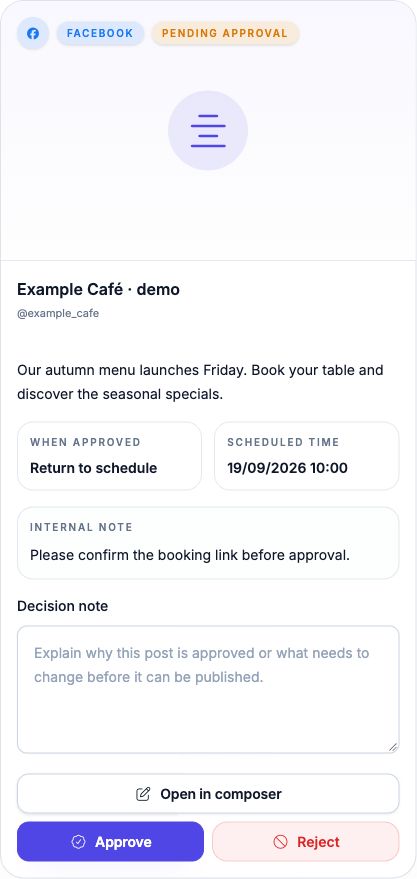
Try one review round with your team
Example: a café team prepares “Our autumn menu launches Friday” with an image and a scheduled time. The reviewer returns it with “Add the booking link.” The author edits the draft and resubmits. The reviewer checks the updated version and approves. Finally, the publishing owner checks the destination post.
Read the approval workflow guide →Built for an internal team review
For small brand teams and agencies whose colleagues work inside a shared workspace. Give teammates the channel access and publishing permissions they need.
Choose the workflow that fits your team
- Review is permission-based. Owners and teammates with direct publishing permission can publish without submitting for review.
- A client who needs to review must have the appropriate workspace access. This page does not offer a no-login client portal or a multi-stage approval chain.
- RSS, CSV imports, AI publishing tasks and API requests use separate scheduling paths. Do not assume every automated post enters this approval queue.
- Channel availability depends on the plan, account and platform permissions. Approval does not guarantee delivery to a social network.
Check team access before choosing a plan
Compare the current channel limits, team features and trial terms on the pricing page. Confirm the intended author and reviewer can access the same channel before starting a live campaign.