
Social Media Approval Workflow: From Draft to Published Post
Set clear ownership, review deadlines and publishing checks with a practical approval workflow for small teams and agencies.
A social media approval workflow should prevent the wrong content from reaching the wrong audience without turning every post into a meeting. The essential decisions are simple: who may draft, who may approve, and who checks what happened after publication.
Separate ownership from access
Assign a content owner, a reviewer and a publishing owner. One person may hold two roles in a small business, but make that explicit. Give each colleague the access needed for their work; sharing the brand account password makes responsibility harder to trace.
| Stage | Owner | Exit condition |
|---|---|---|
| Brief | Campaign owner | Audience, message, destination and deadline agreed |
| Draft | Creator | Copy, assets and links ready to inspect |
| Review | Reviewer | Changes resolved or approval recorded |
| Schedule | Publishing owner | Account and time confirmed |
| Verify | Publishing owner | Destination post checked or issue assigned |
Agree on what needs approval
Distinguish routine educational posts from price changes, promotions or sensitive announcements. Decide internally which messages need extra review. A team role in software does not replace that decision, and an editorial review is not legal clearance.
For an agency, agree whether the client reviews each post or an entire campaign brief. Confirm a contact and a response deadline. Do not assume that an internal approval screen automatically provides a separate client portal or a multi-stage sign-off process.
Use a six-point review checklist
- Accuracy: are names, product details and claims supported?
- Destination: is this the correct brand, account and audience?
- Offer: do price, dates and availability match the landing page?
- Media: is the asset usable, correctly cropped and cleared for use?
- Action: is the link correct and the next step understandable?
- Timing: is the time zone right and the message still appropriate?
Return one consolidated set of changes. “Replace the expired offer and link to the current booking page” is actionable; “make it stronger” is not. If the offer, asset or destination changes after review, review that material change again.
Apply it in PostReply
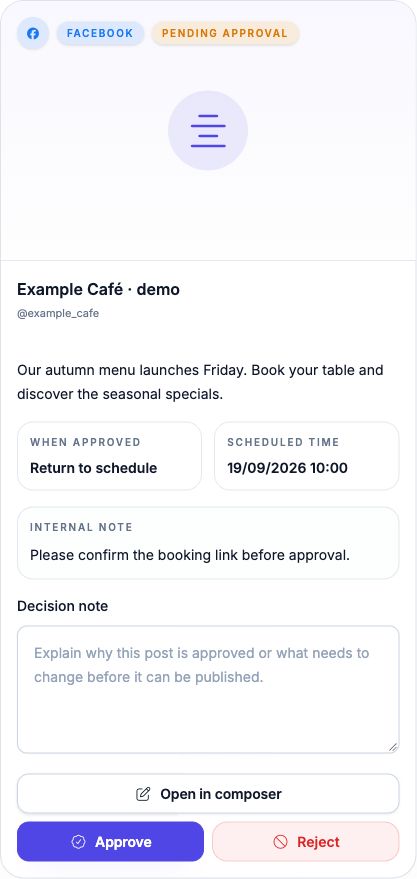
Use Teams to organize workspace access, and Publishing to prepare content. PostReply includes an approval area for pending reviews. Access and required review depend on the active workspace and permissions. Check the actual review requirement for the submitting teammate before relying on it as a control.
As an onboarding exercise, prepare an ordinary draft with the intended teammate and have the reviewer inspect it. Confirm the reviewer can access the right account and that the post reaches the intended state. Do this before committing a time-sensitive campaign. A successful approval is still distinct from successful delivery to a social network.
Set a missed-deadline rule
If approval is missing, hold the post and assign a new time. If a connection fails, assign the account owner to reconnect it. If the platform reports success but visibility is unclear, inspect the destination before retrying. Repeated submission can create duplicate posts.
Review the number of late approvals and recurring corrections each week. Shorten the checklist only where it removes no useful protection. The goal is a clear decision at each stage, with a named person responsible for the next step.
Pair this workflow with a four-week content calendar and the publishing troubleshooting guide.
Try one review round with your team
Example: a café team prepares “Our autumn menu launches Friday” with an image and a scheduled time. The reviewer returns it with “Add the booking link.” The author edits the draft and resubmits. The reviewer checks the updated version and approves. Finally, the publishing owner checks the destination post.
Before your first live campaign
- Use an author without direct publishing permission and a reviewer with approval permission.
- Submit one ordinary post and confirm it appears in Approvals with the correct channel and time.
- Reject it with a useful note, edit the draft and submit it again.
- Approve the updated post. For immediate publishing, approval can trigger delivery at once; use a future time when testing the review.
- Check Queue and the destination platform separately. A review decision alone is not proof of publication.
See PostReply’s team approval software · Compare plans and team access